Fragmented information
Procedures, presentations and videos are spread across folders, emails and tools. New arrivals struggle to know where to start.

Onboarding and internal training
Help new people understand your organisation’s processes, tools and knowledge. Give every team a central place to learn and stay up to date, from day one onwards.
With Knowkube, you turn company documents and expertise into digital pathways by role and audience. Combine on-demand courses, live discussion and progress data in an academy under your brand.
A resource for every stage of the journey
Your academy, your brand

Courses, pathways and progress

Company procedures, documents and knowledge

Live discussions and deeper learning
From information to a learning pathway
A folder of documents and a few meetings are not enough to clarify what to learn, in what order and where to find help. The same need arises when processes, tools or responsibilities change.
Procedures, presentations and videos are spread across folders, emails and tools. New arrivals struggle to know where to start.
A shared foundation helps, but each role requires specific knowledge. Giving everyone the same materials does not meet every need.
Internal experts’ explanations are valuable. Without content to consult, each new employee means covering the same topics again.
Distributed employees and operational commitments make it difficult to deliver all training in meetings at the same time.
Sharing materials does not tell you whether a pathway has been followed or which topics need clarification.
New tools, processes and responsibilities require training updates for existing employees too.
The solution
A corporate academy is a digital environment for organising employee training, from initial onboarding to ongoing updates. It brings courses, pathways and learning activities together in a recognisable place.
Knowkube connects content creation, on-demand learning, live sessions and analytics. You can customise the learning environment and organise pathways around your audiences and project objectives.
How it works
Define what each person needs to know, organise pathways in the academy and add content and live meetings according to project objectives.
Organise and deliver
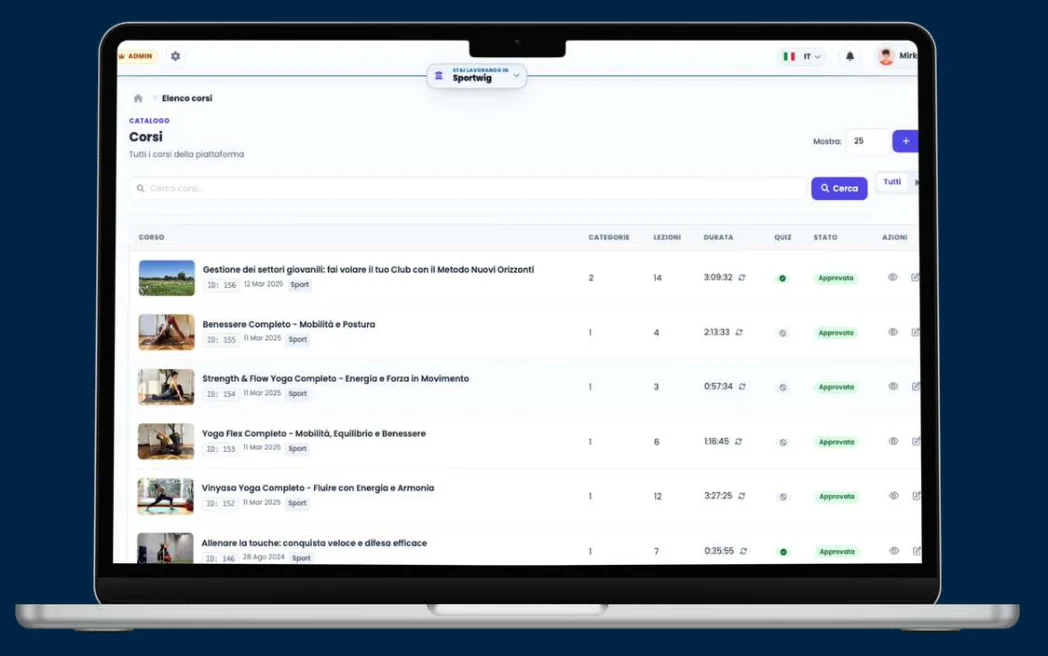
Organise video or SCORM courses and learning pathways, manage users and monitor progress. On-demand learning lets people in different locations access content without attending at the same time.
Explore K.LMSCreate and update
Turn procedures, presentations and company knowledge into structured courses with AI support. Create and update modules, lessons and tests, with SCORM-compatible output.
Explore K.CoachGo deeper in live sessions
Organise welcome meetings, deeper learning with internal experts and interactive training sessions. Quizzes, polls and feedback collect questions; engagement signals help trainers understand participation.
Explore K.LiveUse cases
One academy can host different pathways. Start with employees’ real situations and the knowledge needed to address them.
Measurement and analytics
Onboarding and employee training coordinators need to know how pathways are progressing. Knowkube makes training activities and signals visible, from on-demand courses to live sessions, to guide further learning.
Use K.LMS dashboards to review academy, course and individual user progress.
In K.Live sessions, observe interaction, quiz responses and feedback alongside attention and engagement signals.
Use data and insights to identify topics to revisit and guide pathway updates.
Read progress, test results and participation in relation to pathway objectives. For operational activities, complement digital learning with practice and discussion with managers.
Frequently asked questions
Start with knowledge shared by everyone and knowledge specific to each role. K.LMS lets you organise videos, SCORM courses and assessments into dedicated pathways. K.Live adds meetings with key contacts; K.Coach supports course creation from company materials.
Yes. K.Coach uses company documents and materials as a basis for creating modules, lessons and tests with AI support. Company specialists should review and validate content before distribution.
Yes. K.LMS lets you organise courses and pathways and manage users, roles and permissions. Academy structure and access are defined around the audiences and needs of the project.
Yes. K.LMS manages video and SCORM courses, while K.Live enables interactive sessions, quizzes and discussions. Both modules belong to the same Knowkube ecosystem.
K.LMS dashboards show activities, completions and results down to individual users. K.Live offers participation and engagement signals during sessions. Together with assessment results, this data helps identify where to deepen learning.
Yes. The learning environment can be customised with your organisation’s brand. Structure, audiences and access roles are defined according to project needs.
Yes. The academy can host pathways for new employees as well as updates on products, processes and tools, and content for role transitions.
From your people to your project
Start with roles, the materials you already have and the knowledge to share. Discover in a demo how to organise onboarding and employee training with Knowkube.
New employees, teams and managers: an academy built around your organisation.